Estimation View
This view is being rolled out gradually. If you don't see it yet, it hasn't been enabled for your workspace.
Relative estimating means comparing: is this Story bigger than that one? The Estimation View makes that visible. It is a board on which Stories stand in columns by size, the unestimated ones on the left and the values of the scale ascending next to them. You estimate by dragging a Story into the matching column. The number lands on the Story right away, without you transferring anything, and the forecast in the Estimation Widget adjusts.
You reach the view in Prepare as the third view (keys 2 3, see Phases and views).
Layout
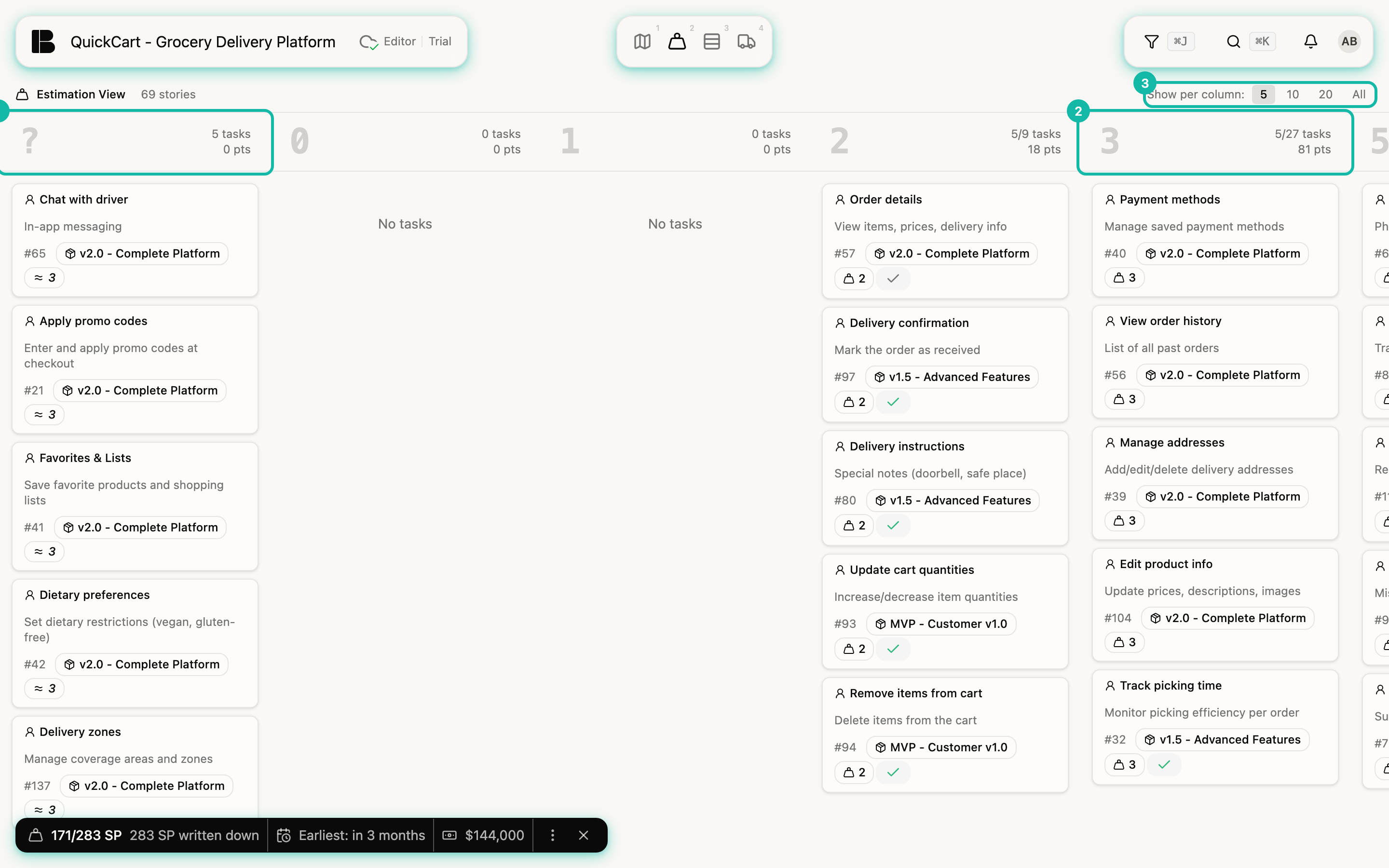
- The ? column collects Stories without an estimate of their own. They already count with the median (see Automatic estimates), so you don't have to empty the column. Next to it stand the columns 0, 1, 2, 3, 5 and on up to 100. Scroll to the right when not all columns fit on the screen.
- Each column names its number of tasks and the sum of its points, for example 5/27 tasks and 81 pts: five of 27 visible.
- Only Stories appear, no Epics, Dev and Project Stories or Workitems. The filter applies here too.
- Within a column, the most recently changed Stories are on top.
- Show per column: With 5, 10, 20 or All you limit how many cards a column shows. Betterplan remembers the choice per project in your browser. With the default of 5 you keep an overview of 69 Stories.
Estimating together
- Open the Estimation View and choose Show per column: 5.
- Take a Story from ?, for example Chat with driver, and drag it into a middle column, say 3. This is your reference.
- Take the next Story and ask the team: more or less work than the reference? Twice as much? Drag it into the matching column.
- If you put a Story in the wrong place, drag it into another column. Dragging it back to ? deletes the estimate.
A Story you drop into another column gets that estimate immediately. There is no confirmation. If you release it in its own column, nothing changes.
Why the comparison matters and not the single number is explained in Estimating: the basics.