Rapid Estimation
This feature is being rolled out gradually. If you don't see it yet, it hasn't been enabled for your workspace. It also requires the Estimation Widget to be visible to you.
At the start of a project you are asked to estimate although hardly any details exist. You then have Initiatives and Epics, but only a few Epics with written-out Stories. Rapid Estimation extrapolates an estimate for the whole project from these few estimated Stories, traceably and with built-in plausibility checks. With every Story you write out and estimate later, the extrapolated share shrinks.
Rapid Estimation extrapolates Epics and Initiatives that have no Stories yet. Automatic estimates, on the other hand, give every existing User Story without an estimate of its own the median. The two work together, but you don't need Rapid Estimation to plan with unestimated Stories.
How Betterplan calculates
You choose a reference Epic whose Stories you know completely and have estimated. Betterplan divides the sum of its Stories by the estimate of the Epic. The result is the S2E factor (Story to Epic): it says how many Story Points are in one Epic point. All other Epics that you only estimated roughly are extrapolated with it. One level up it works the same way: with a reference Initiative you get the E2I factor (Epic to Initiative).
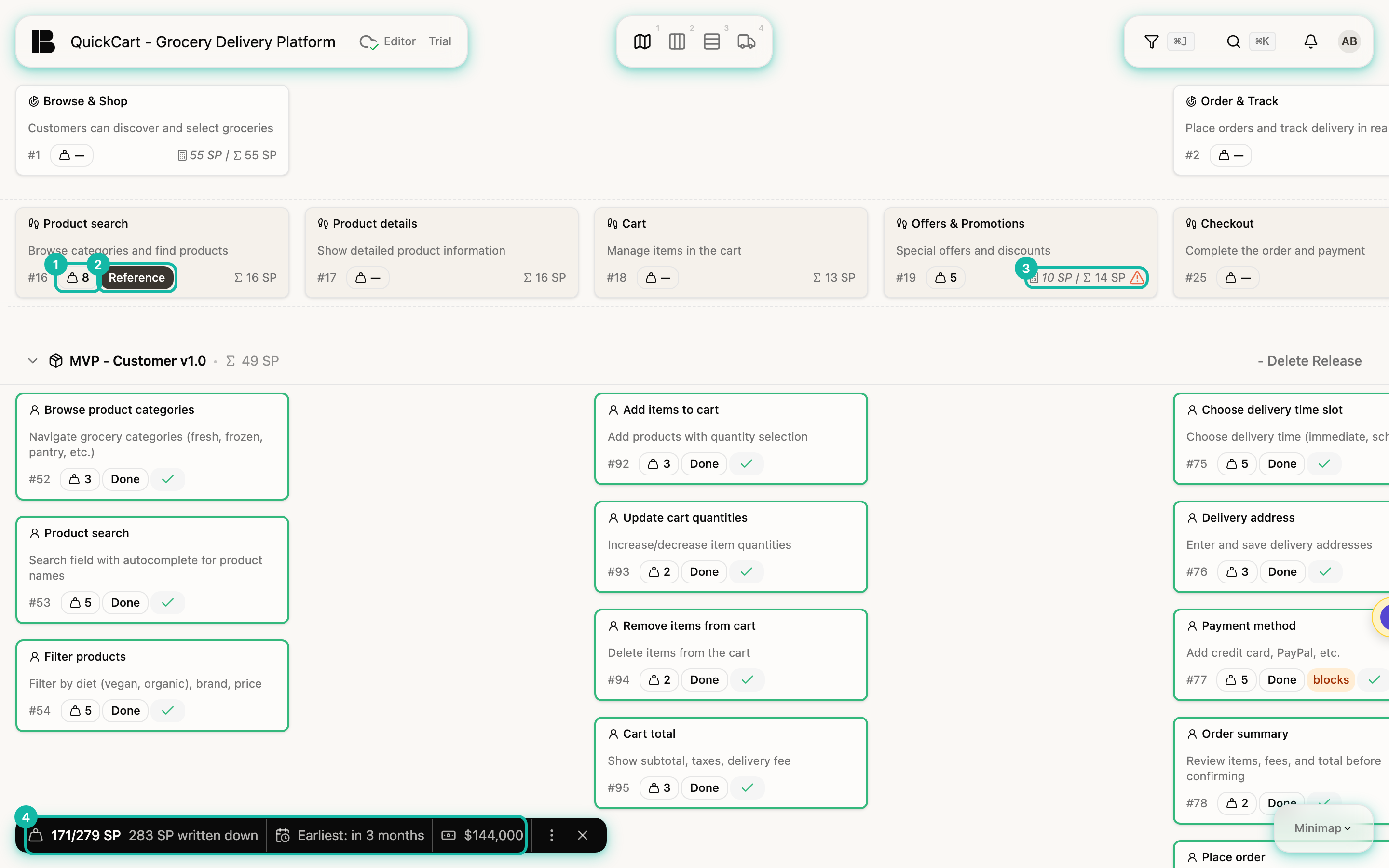
An example with QuickCart: the Epic Product search has Stories worth 16 points in total. You estimate the Epic itself at 8 and mark it as the reference. The S2E factor is 16 divided by 8, so 2. If you estimate the Epic Offers & Promotions at 5, Betterplan counts it as 5 times 2, so 10 points.
Step by step with QuickCart
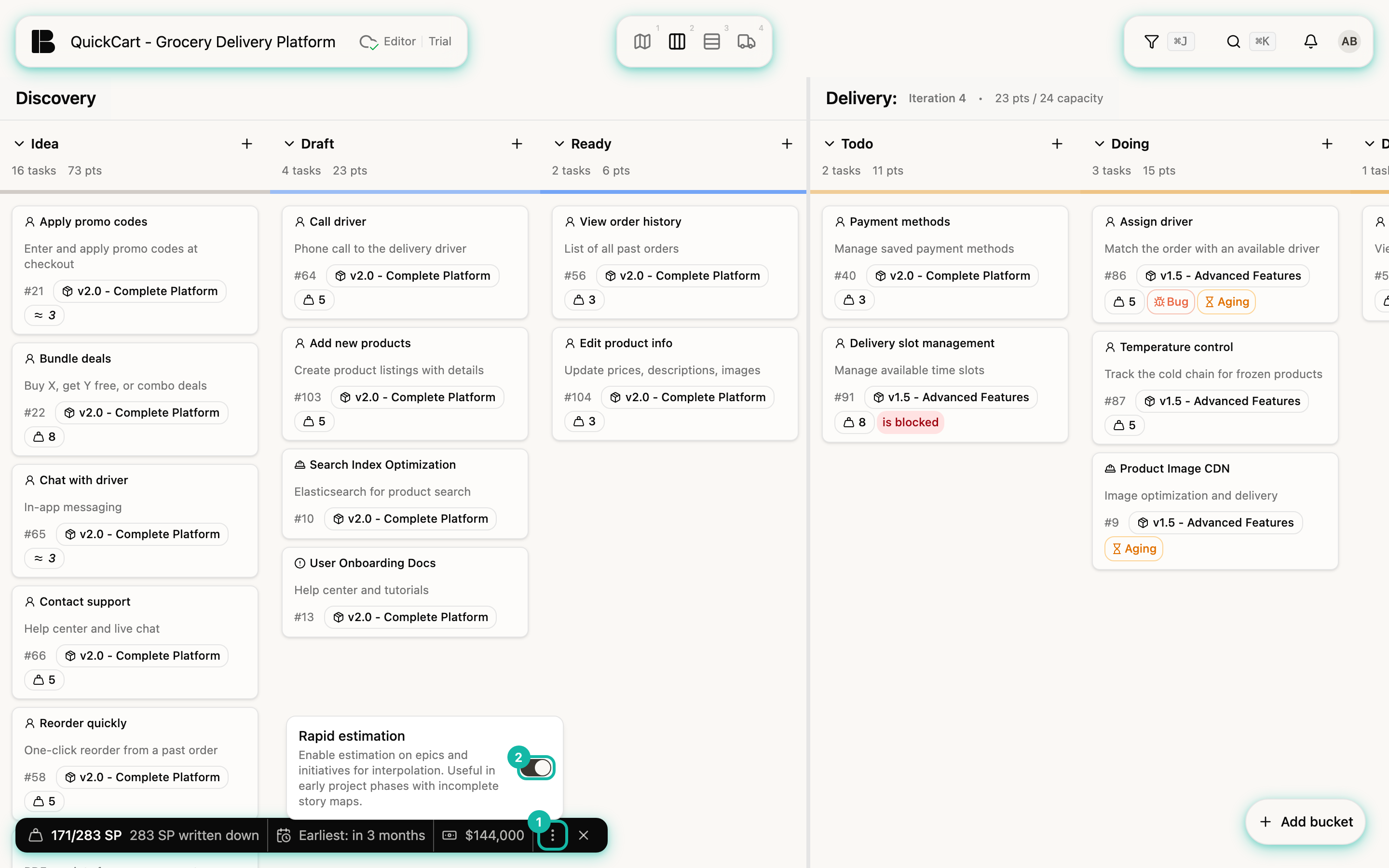
- Turn on Rapid Estimation. In the Estimation Widget's bar, open the menu (the three dots) and switch on Rapid estimation. In QuickCart the switch is already on.
- Estimate Epics and Initiatives. In the Storyboard, the cards of Epics and Initiatives now carry the same estimate selection as Stories. Estimate them relative to each other, as you do with Stories.
- Set the reference. As soon as an Epic has an estimate, the Reference switch appears next to it. Turn it on for the Epic whose Stories are fully written out and estimated. This sets the Epic's state to Ready. If you switch it off again, Betterplan removes the state. On the other Epics the switch then disappears, there is only one reference per level. You do the same for Initiatives.
- Read the result. The widget now shows the extrapolation as the total and next to it how many points are actually written down. The gap between the two is the signal: that much work sits in Epics that nobody has broken into Stories yet.
- Check plausibility. On extrapolated cards, the calculated sum appears next to the actual sum of the Stories, for example 10 SP / Σ 14 SP. If the two differ a lot, a triangle warns you.
Rapid estimation is a project setting. If you flip it, the view changes for everyone working on the project.
How the plausibility check decides
For an Epic with its own estimate and Stories, Betterplan compares this Epic's factor (sum of the Stories divided by its estimate) with the reference's factor. If it lies between 0.7 and 1.3 times that, everything is fine. Otherwise the warning appears. For Offers & Promotions it is 14 points on 5 Epic points, so 2.8 against 2.0: a ratio of 1.4. There are usually two reasons: the Epic is not broken down far enough and Stories are missing, or the area turned out smaller than expected. Adjust the estimate or the Stories and the warning disappears. The reference itself is never flagged, its factor is the yardstick by definition.
Without a reference, Betterplan does not extrapolate but sums the Stories. So you see sensible numbers before you have chosen a reference.
Once most Epics are broken into estimated Stories, the extrapolation is no longer worth it. The sum of the Stories is enough then, and the widget shows the same as progress.