Create, complete and correct iterations
An Iteration is the period in which your team builds a selection of stories. Betterplan knows at most one active iteration at a time. It decides what appears on the Iteration Board, and with every completed iteration Betterplan learns how many story points your team delivers (the velocity, see Estimating).
In the example project QuickCart, Iteration 4 is running with the goal Pay with saved cards. Three iterations before it are completed.
An iteration starts
You don't fill in a form for a new iteration. Betterplan creates it, in three ways:
- On completing one: The successor starts the moment its predecessor ends (see below).
- Through work: If you move a story to Draft or later (Todo, Doing, Done) while no iteration is active, Betterplan starts a new one and puts the story in it.
- By hand: With no active iteration, the Iteration Board shows a panel No active iteration with the button Create iteration.
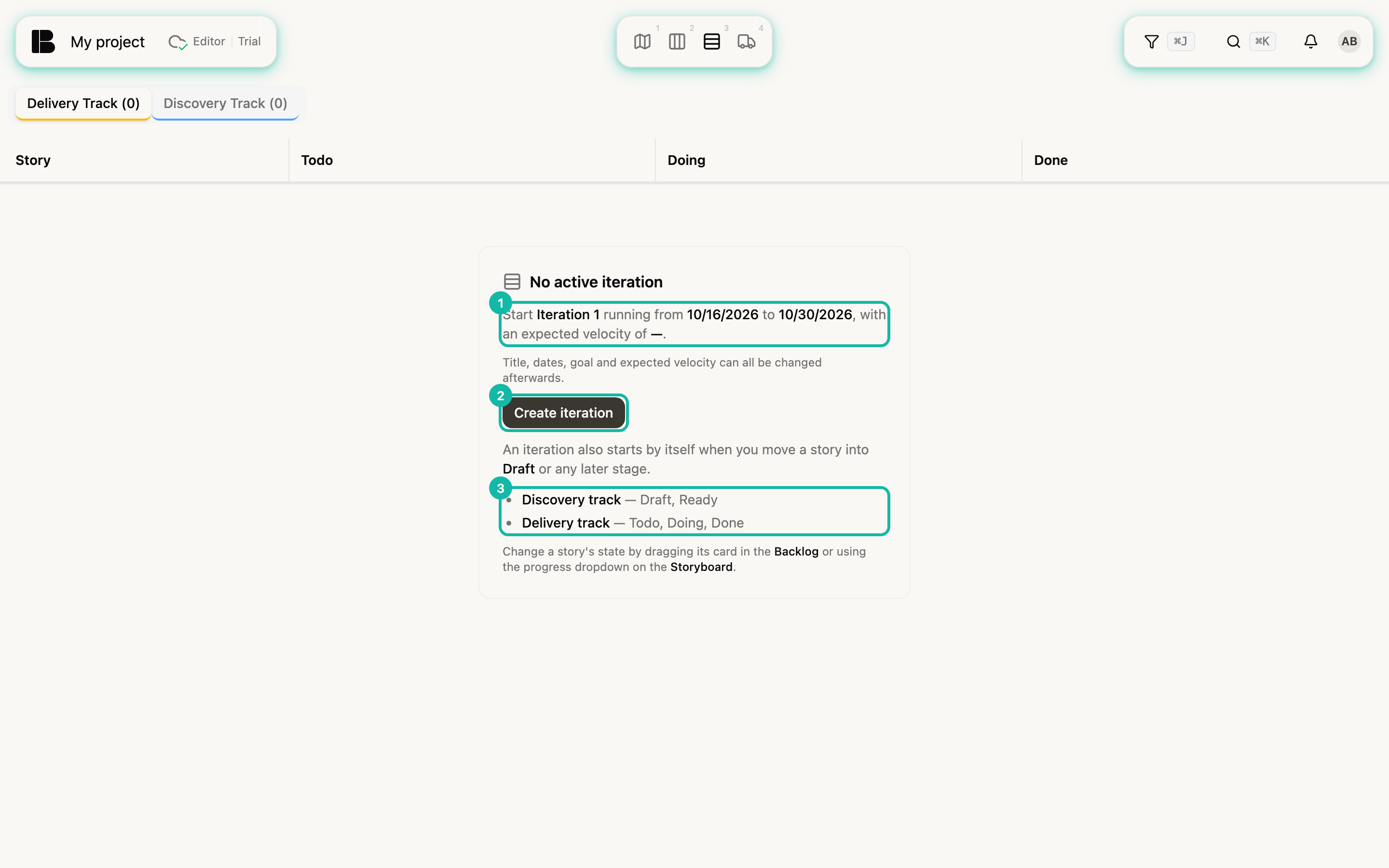
The panel tells you beforehand what the click produces:
| Value | Where it comes from |
|---|---|
| Title | Iteration N; the number is a label, not a count. You can rename it at any time. |
| Start | Now |
| End | Start plus Iteration Length (Weeks) from the project settings, two weeks by default |
| Expected velocity | The actual velocity of the last completed iteration, otherwise the velocity from the project settings, otherwise — |
There are never two active iterations. While one is running, Betterplan doesn't offer Create iteration and also refuses creating one through the API.
Change title, period, goal and velocity
On the Iteration Board, click the iteration's title, goal or date line. Edit Iteration opens.
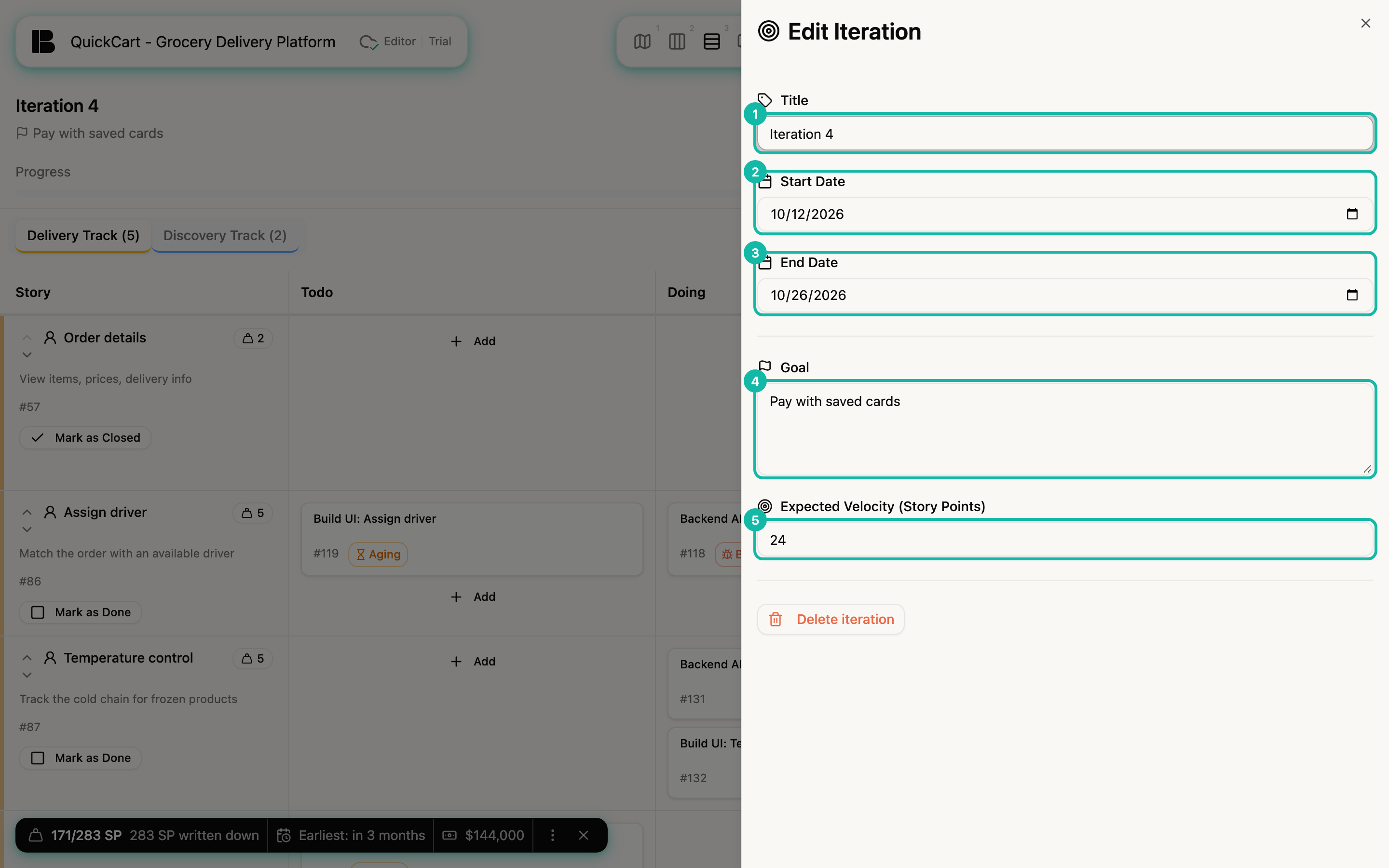
Betterplan saves as soon as you leave a field or close the panel. Title and both dates are required. If you empty Expected Velocity (Story Points), Betterplan derives the capacity from past velocity again. The Goal appears under the title; without one it reads No goal set - click to add one.
If the end date has passed and the iteration is not completed, its status is Overdue, and a notice above the board reminds you to close or extend it. Extending means setting the End Date later here.
Plan stories
There is no "add to iteration" button. Membership follows the story's state (States):
- A story joins the active iteration when it moves to Draft, Todo, Doing or Done, in any view (Kanban, Storyboard, Iteration Board, details).
- Moving from Idea straight to Ready doesn't add it. Ready means discovery is finished, and no iteration saw that happen for this story.
- A story leaves the iteration when you move it back: to Idea always, from Todo, Doing or Done to Ready. This doesn't ask for confirmation and deletes no data; the lead times are kept.
- A story you later move to Todo or beyond joins the iteration that is active then.
Whether a story shows on the board depends on state and iteration, not on a selection. Iteration Board shows which states belong to which track.
Complete an iteration
Click Complete Iteration at the top right. Betterplan asks, with a summary of what will happen:
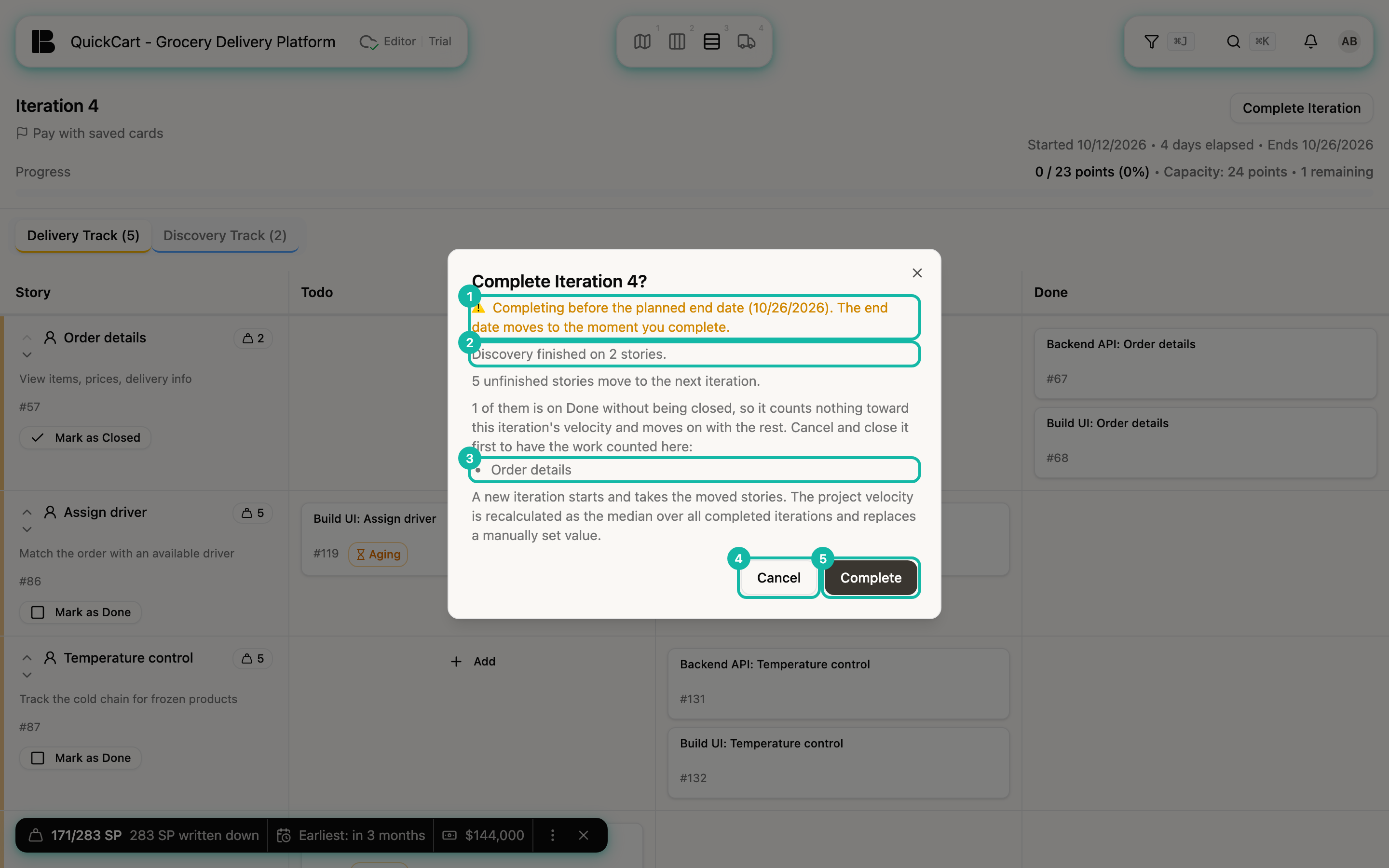
The dialog informs, it changes nothing. If you want to intervene, cancel, tidy up on the board and complete again. In order, it names:
- Note about completing early: If you complete before the planned end, the end date moves to the moment of completion.
- What is finished: How many stories are finished, split into delivered (closed while on Done) and discovery finished (open on Ready). Only delivered work counts toward the iteration's velocity.
- Dropped work: Stories you closed without delivering count nothing toward velocity (Open and closed).
- What moves on: Every story that is not closed moves to the next iteration. That includes stories on Done that are still open. Stories on Ready and closed stories stay in the old iteration. A story on Idea belongs to no iteration anyway.
- Stories on Done that are not closed: They count nothing toward this iteration's velocity until they are closed, and the dialog names them. In the example that is Order details. Cancel and close them with Mark as Closed so the points count here.
Complete confirms. Then this happens:
- Betterplan records a snapshot: velocity, backlog size and the iteration's stories as they stand now.
- The iteration counts as completed and is frozen. It never becomes active again.
- A new iteration starts and takes the unfinished stories along with their workitems.
- The project velocity is recalculated and replaces a value you entered by hand.
Completing writes a snapshot and opens the next iteration. There is no second completion of the same iteration. Fix mistakes later by correcting the snapshot (see below) or, as a last resort, by deleting the iteration.
The dialog still says median. In fact, Betterplan replaces the project velocity with the average of the three most recently completed iterations, as described in Estimating.
Correct the snapshot
Sometimes a snapshot no longer fits: a story was on Done when the iteration closed and was only closed the next day, or a story was missing. Then you correct the snapshot of the completed iteration. This is only possible in the Iterations view (see Iterations overview):
- Open the completed iteration, for example Iteration 3.
- Click Correct snapshot.
- Decide per story. Each row offers: change the points, Count here (counts the story here with its points), the X (takes it out; the undo arrow brings it back). The search field Add a story to this iteration… adds a missing story.
- Click Review changes.
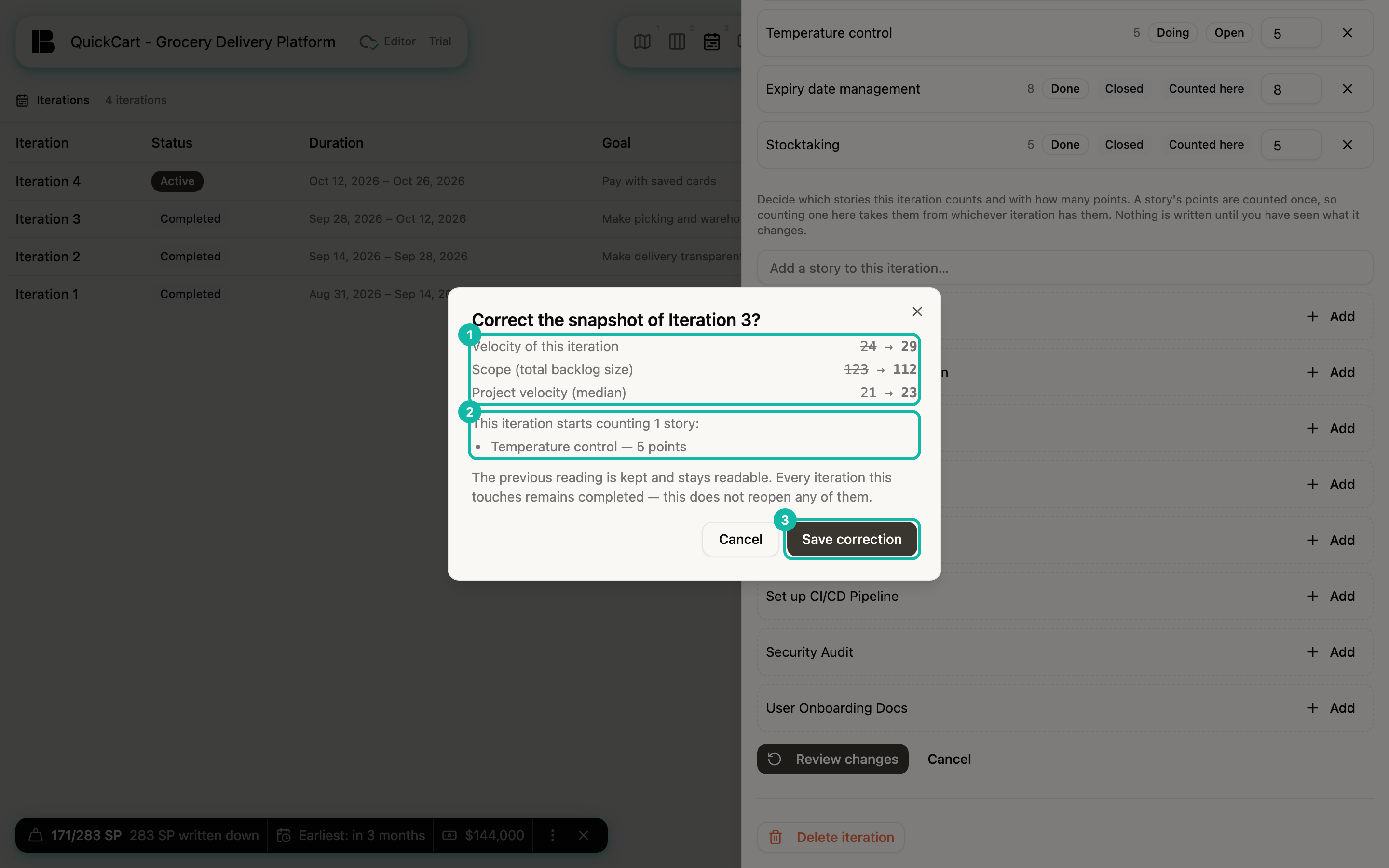
The dialog Correct the snapshot of …? names every figure that changes with its old and new value: Velocity of this iteration, Planned story points, Scope (total backlog size), Discovery stories, Delivery stories and Project velocity. Anything that stays the same isn't listed. Only Save correction writes anything.
Good to know:
- Points count once. If you count a story here, Betterplan takes it from the iteration that had it before. The dialog names that iteration and its new velocity.
- Recompute without changes: If you click Review changes right away, Betterplan recomputes the snapshot from today's story states. This counts, for example, the story that was only closed after the iteration ended.
- Nothing is lost. A correction appends a new snapshot; the old one is kept. The iteration stays completed.
- You can count a story created after the iteration ended. The dialog points that out.
- Only completed iterations can be corrected, and only with write access. A running iteration always shows the current state anyway.
Delete an iteration
In Edit Iteration (running iteration) and in the detail view (any iteration) you find Delete iteration. The dialog names what goes with it:
- For a running iteration, its stories belong to no iteration afterwards. The board then shows the panel No active iteration.
- For a completed iteration, its snapshot goes too: velocity, burndown and the frozen stories. The project velocity is recalculated from the remaining iterations.
Deleting doesn't reopen the predecessor and doesn't bring back stories that moved on. This cannot be undone.