The building blocks: Initiative, Epic, Story, Workitem
Betterplan has only a few building blocks, but they are clearly separated. Two of them give structure (Initiative and Epic), the others are work that actually gets built (Story and Workitem). Once you have internalized this split, every piece of work has an obvious place.
The hierarchy at a glance
Initiative   the goal                       "Browse & Shop"
└── Epic     a step toward the goal         "Product search"
    └── Story   one way to fulfil the step   "Product search"
        └── Workitem   a unit of work inside an iteration   "Backend API: Assign driver"
| Building block | What it stands for | Is it built? |
|---|---|---|
| Initiative | A business goal: the outcome you want to achieve. | No, it sets the direction. |
| Epic | A step in the process that fulfils the goal. It bundles several options. | No, it structures the path. |
| Story | A concrete way to fulfil a step. There are three kinds, see Story types. | Yes. |
| Workitem | The smallest unit of work, belongs to exactly one Story. | Yes, but only to coordinate work within an iteration. |
Betterplan enforces the hierarchy: an Epic needs an Initiative as its parent, a User Story needs an Epic, and a Workitem needs a Story. Project and Devteam Stories belong to no Epic and need no parent.
Example: QuickCart
In the example project QuickCart you can read the hierarchy straight off the Storyboard: Initiatives on top, their Epics below, and the Stories below those.
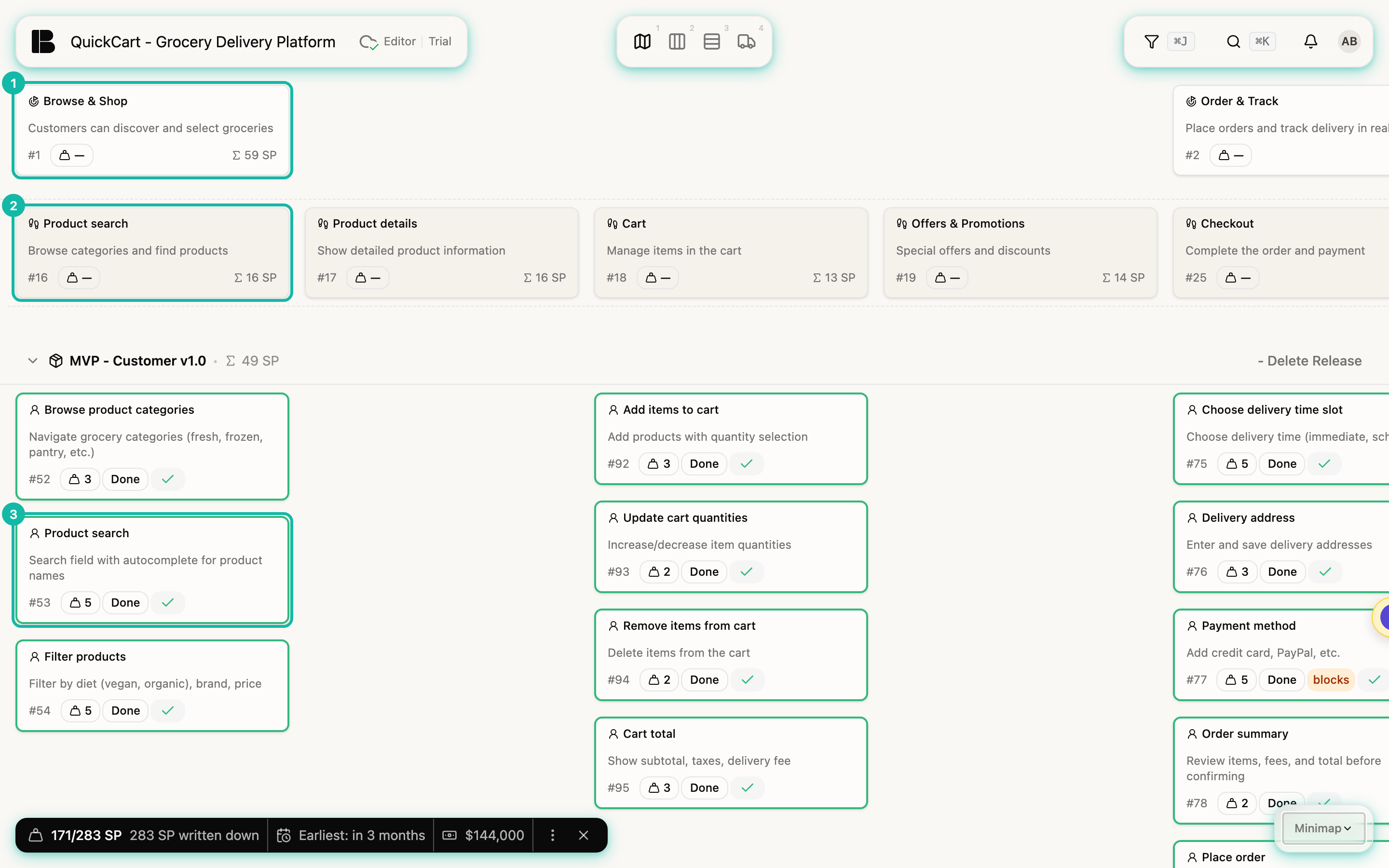
- The Initiative Browse & Shop describes the goal: customers can discover and choose groceries.
- Its Epics are the steps toward it, for example Product search, Product details and Cart.
- Under the Epic Product search hang the Stories, the options for fulfilling that step: Browse product categories, Product search with autocomplete, Filter products and Sort products.
- Workitems only come into play when a Story is built. On the Iteration Board, the Story Assign driver splits its work into Backend API: Assign driver and Build UI: Assign driver.
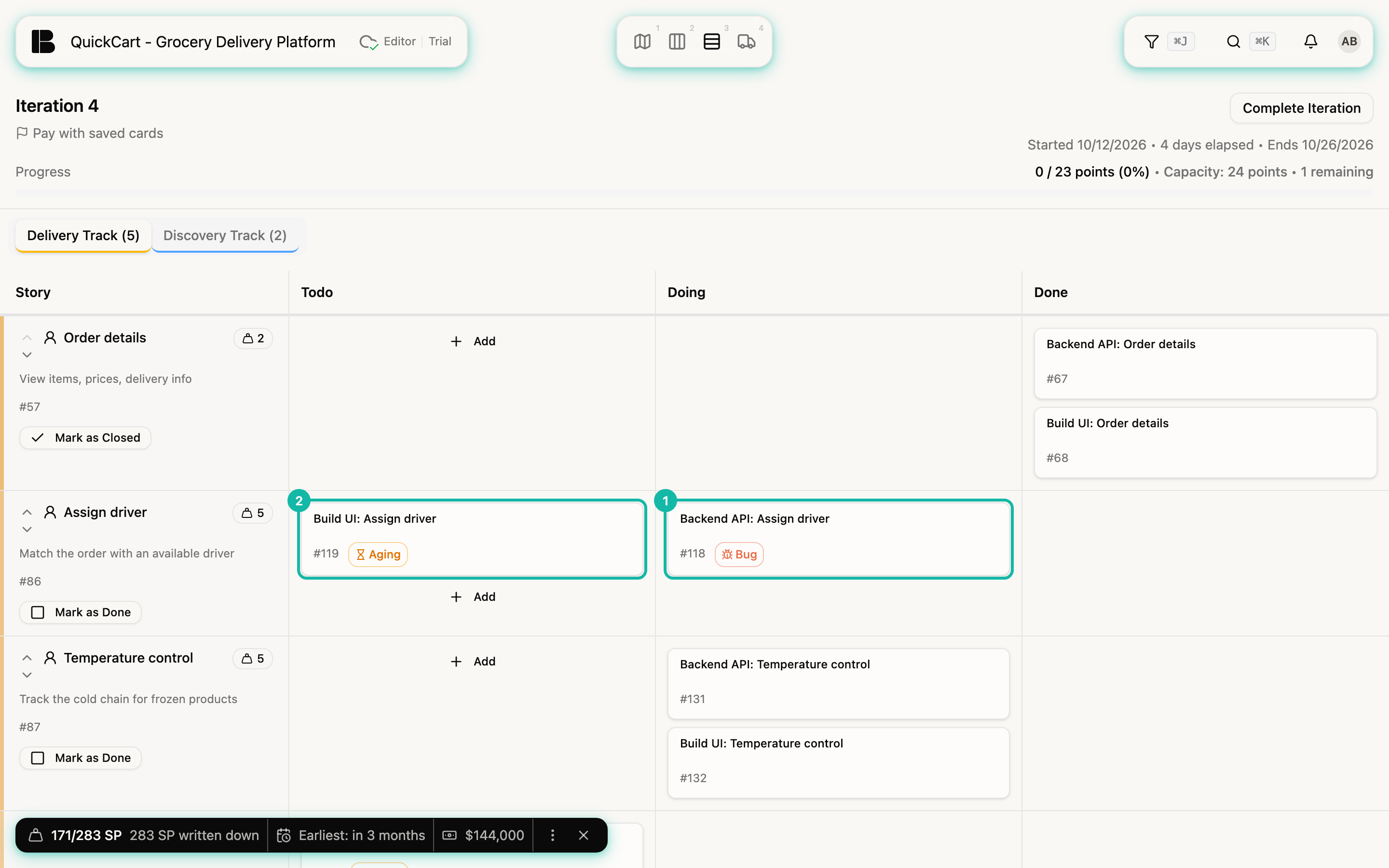
How to create and move workitems on the board is covered in Iteration Board.
How to check that the structure is right
Read the Storyboard from left to right like a screenplay: Initiatives and Epics tell the story of your users within your endeavor. If it reads right, the structure is right. From top to bottom come the options of an Epic, the obvious ones on top and supplementary ones below. That is the narrative of the structure and a first assumption, not the priority, see Prioritizing.
Structure is allowed to change:
- An Epic with only one way to do it is probably really a Story.
- A Story that keeps growing options is probably an Epic.
- An Initiative that is too vague to act on gets broken down into Epics, the steps.
Where do bugs go?
A bug is not a Story of its own. You create it as a Workitem on the affected Story and mark it as a Bug. That way the knowledge stays with the Story. In the example, the Story Assign driver carries a Workitem with a bug marker (see the screenshot above, number 1).
Don't put numbers or prefixes like "E1.1" into titles. Order and hierarchy already live in the structure, and a number in the title goes stale the first time you reorder.